An online robot cell builder that runs in your browser. Lay out pallets, conveyors and guarding in 3D, click to teach Home, Pick and Place, then download a ready-to-run KUKA KRL or ABB RAPID program. No simulation licence, no installs, no hand-written code.

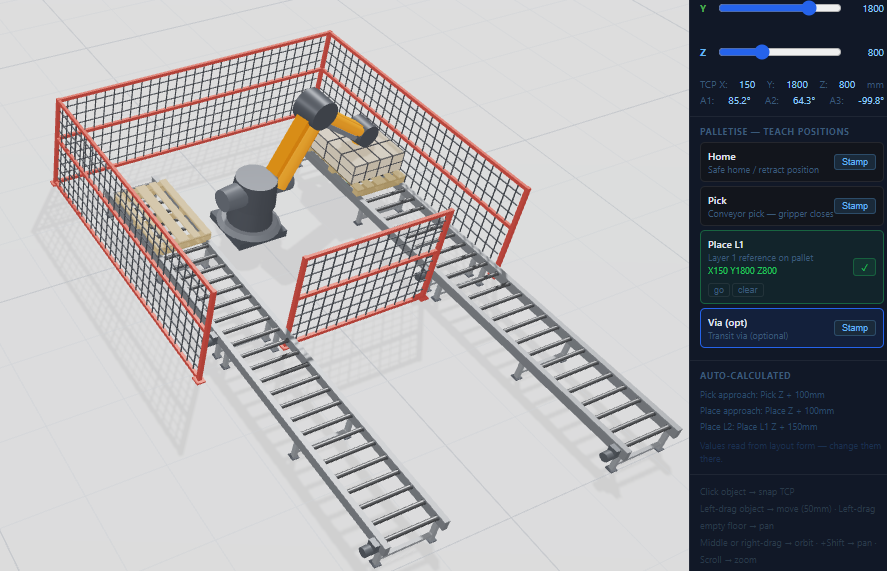
Drop in the robot, pallets, conveyors and fence panels. Size, rotate and snap parts, and measure distances so the layout matches the floor.
Click a pallet and the robot snaps to its centre. Stamp Place L1, Pick and Home. Optional via points route round obstacles.
Download KUKA .SRC/.DAT or ABB .MOD with your taught positions, approach offsets and layer indexing already calculated.
Copy the files to the controller, select the program and run it in T1. The robot goes to the positions you taught in the browser.
Roller and belt conveyors, infeed and outfeed pallets, fence panels and pedestals, all resizable in any dimension.
Snap pallets to conveyors and fences to corners, align and mate parts, and measure between components.
KUKA KR 60 to KR 300, ABB IRB 6700 and UR20, with reach and kinematics from manufacturer datasheets.
Jog the TCP with sliders or snap to an object, then stamp Home, Pick, Place and Via positions into the program.
Undo and redo, copy and paste with the usual shortcuts, and top, front, side and iso views.
Rows, columns, layers, box sizes, gripper offsets and separator sheets, with automatic Z indexing per layer.
KUKA.Sim, ABB RobotStudio and RoboDK are excellent full simulation packages. Path2 does one job they don't: turn a cell layout straight into a robot program, in a browser, for the cost of one project.
| Path2 cell builder | Desktop simulation (KUKA.Sim, RobotStudio, RoboDK) | |
|---|---|---|
| Install | None, runs in the browser | Windows install |
| Cost | Free to design, £149 per program | Annual licence per seat |
| Robot brands | KUKA & ABB code output | Usually one brand per package (RoboDK: many) |
| Palletising program | Generated from the layout | Built or scripted by the programmer |
| Full cycle-time simulation | Not yet | Yes |
Yes. Building a cell, teaching positions and previewing the layout is free in your browser, and there's a free KUKA KRL sample (3×2×1 pallet) to prove the code on your own robot. A full custom program export is £149.
No. The cell builder runs in your browser with nothing to install and no offline-programming licence. You design the cell, teach Home, Pick and Place by clicking, and Path2 writes the robot program.
The robot library includes KUKA KR 60, KR 120, KR 210 and KR 300 profiles, ABB IRB 6700 variants and the Universal Robots UR20, built from manufacturer datasheets. Programs export as KUKA KRL (.SRC/.DAT) or ABB RAPID (.MOD).
Yes. A palletising cell designed in the cell builder was recreated in a workshop and run on a real KUKA KR210 on KRC4. The positions taught in the browser ran from the pendant with no code edits and no positions taught on the robot, 19 minutes from starting the design to the finished cycle.
Infeed and outfeed pallets, roller and belt conveyors, fence panels and pedestals. Every part can be resized in any dimension, rotated, snapped to other parts, copied and pasted, and measured against other components. There's undo and redo too.
No. Path2 generates the robot program from your layout; you still need site-specific validation and a risk assessment. Always prove a new program in T1 at reduced speed. Our free Build Your First Robot Cell guides cover the safety side.
Free to design. Free KRL sample to prove it on your robot.
Open the cell builder →Planning a whole cell? Read the free Build Your First Robot Cell guide series, or the robot cell layout guide.